|
|
|
HOME > HTML & CSSパーツ > CSS box(ボックス)サンプル > boxを横に並べたサンプル2 |
|
boxを横に並べたサンプル2 |
|
|
|
|
|
|
|
|
|
ボックスを横に並べたサンプルの紹介です。 |
|
見出し(H3)と画像、テキストがすべて設定されたサンプルですので、コピーしてご自身の |
|
ホームページにすぐにでも利用可能です。 |
|
どんなデザインにもあうボックスですので、いろんなページでご利用いただけると思います。 |
|
|
|
ボックスを横に並べたサンプル |
|
|
|
|
| サンプルA |

ここに文字を記入します
ここに文字を記入します
ここに文字を記入します
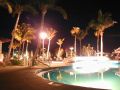
ここに文字を記入します
ここに文字を記入します
ここに文字を記入します
|
|
| サンプルB |
見出しサンプル
サービス名など
ここに文字を記入します
ここに文字を記入します
ここに文字を記入します
見出しサンプル
商品名など
ここに文字を記入します
ここに文字を記入します
ここに文字を記入します
|
|
|
|
|
見出しの背景で使っている画像 |
|
|
 |
|
h3.gif |
|
|
ご利用の際は必ず、当サイトへのリンクをお願いします。 |
|
ご利用規約を確認の上、ご利用下さい。 |
|
|
|
|
|
|
|
設置方法 |
|
|
|
|
|
| ■サンプルA |
|
|
|
|
|
|
|
|
 HTMLの記載例 HTMLの記載例 |
|
|
CSSの記載例 |
|
|
|
|
|
|
<body>と</body>の間の、設置したい場所に |
|
|
HTML内の</head>の直前に下記を記入して下さい。 |
|
下記を記入して下さい。 |
|
|
外部スタイルシートへ記入してもOKです。 |
|
<div class="box1">
<h3><a href="#">見出しサンプル</a></h3>
<p><img src="img/3.jpg" width="120" height="90"
border="0"></p>
<p>ここに文字を記入します</p>
<p>ここに文字を記入します</p>
<p>ここに文字を記入します</p>
</div>
<div class="box2">
<h3><a href="#">見出しサンプル</a></h3>
<p><img src="img/4.jpg" width="120" height="90"
border="0"></p>
<p>ここに文字を記入します</p>
<p>ここに文字を記入します</p>
<p>ここに文字を記入します</p>
</div>
|
|
|
<style type = "text/css">
<!--
a{
color:#000066;/*リンク文字の色*/
text-decoration: none;
}
a:hover {
color: #FF0000;/*リンクの文字の上にマウスが来た時この色に変わる*/
}
div.box1 {
width: 310px; /* ボックスの幅 */
height: 200px;
background-color: #ffffe8; /* ボックスの背景色 */
border: 1px #999999 solid; /* ボックスの枠 */
font-size: 90%; /* ボックス内の文字サイズ */
margin-right:20px;
float: left;
}
div.box1 h3 {
margin: 0;
background: url(img/h3.gif) repeat-x top; /* 見出しの背景 */
line-height: 27px;
padding-left: 10px;
border-bottom: 1px #999999 solid; /* 見出しの下線 */
font-size: 110%; /* 見出しの文字サイズ */
}
div.box1 h3 a {
text-decoration: none;
}
div.box1 p {
margin-top: 5px;
margin-left: 5px;
margin-bottom:10px;
}
.box1 p img{
float:left;
margin-right:10px; /*写真の右にスペース*/
}
div.box2 {
width: 310px; /* ボックスの幅 */
height: 200px;
background-color: #ffffe8; /* ボックスの背景色 */
border: 1px #999999 solid; /* ボックスの枠 */
font-size: 90%; /* ボックス内の文字サイズ */
float: left;
}
div.box2 h3 {
margin: 0;
background: url(img/h3.gif) repeat-x top; /* 見出しの背景 */
line-height: 27px;
padding-left: 10px;
border-bottom: 1px #999999 solid; /* 見出しの下線 */
font-size: 110%; /* 見出しの文字サイズ */
}
div.box2 h3 a {
text-decoration: none;
}
div.box2 p {
margin-top: 5px;
margin-left: 5px;
margin-bottom: 10px;
}
.box2 p img{
float:left;
margin-right:10px; /*写真の右にスペース*/
}
-->
</style>
|
|
|
|
|
■サンプルB |
|
|
|
|
HTMLの記載例 |
|
|
CSSの記載例 |
|
<body>と</body>の間の、設置したい場所に |
|
|
HTML内の</head>の直前に下記を記入して下さい。 |
|
下記を記入して下さい。 |
|
|
外部スタイルシートへ記入してもOKです。 |
|
<div class="box1">
<h3>見出しサンプル</h3>
<p><img src="img/3.jpg" width="120" height="90"
border="0"></p>
<p><strong><a href="#">サービス名など</a></strong></P>
ここに文字を記入します<br />
ここに文字を記入します<br />
ここに文字を記入します
</div>
<div class="box2">
<h3>見出しサンプル</h3>
<p><img src="img/4.jpg" width="120" height="90"
border="0"></p>
<p><strong><a href="#">商品名など</a></strong></p>
ここに文字を記入します<br />
ここに文字を記入します<br />
ここに文字を記入します
</div>
|
|
|
<style type = "text/css">
<!--
a{
color:#000066;/*リンク文字の色*/
}
a:hover {
color: #FF0000;/*リンクの文字の上にマウスが来た時この色に変わる*/
text-decoration: none;
}
div.box1 {
width: 310px; /* ボックスの幅 */
height: 200px;
background-color: #ffffe8; /* ボックスの背景色 */
border: 1px #999999 solid; /* ボックスの枠 */
font-size: 90%; /* ボックス内の文字サイズ */
margin-right:20px;
float: left;
}
div.box1 h3 {
margin: 0;
background: url(img/h3.gif) repeat-x top; /* 見出しの背景 */
line-height: 27px;
padding-left: 10px;
border-bottom: 1px #999999 solid; /* 見出しの下線 */
font-size: 110%; /* 見出しの文字サイズ */
}
div.box1 p {
margin-top: 5px;
margin-left: 5px;
margin-bottom:10px;
}
.box1 p img{
float:left;
margin-right:10px; /*写真の左にスペースを空ける*/
}
div.box2 {
width: 310px; /* ボックスの幅 */
height: 200px;
background-color: #ffffe8; /* ボックスの背景色 */
border: 1px #999999 solid; /* ボックスの枠 */
font-size: 90%; /* ボックス内の文字サイズ */
float: left;
}
div.box2 h3 {
margin: 0;
background: url(img/h3.gif) repeat-x top; /* 見出しの背景 */
line-height: 27px;
padding-left: 10px;
border-bottom: 1px #999999 solid; /* 見出しの下線 */
font-size: 110%; /* 見出しの文字サイズ */
}
div.box2 p {
margin-top: 5px;
margin-left: 5px;
margin-bottom: 10px;
}
.box2 p img{
float:left;
margin-right:10px; /*写真の左にスペースを空ける*/
}
-->
</style>
|
|
|
|
|
|
|
|
|
|
|
|
|
|
|
|
|
|
|
|
|
|
|
|
 HOME
HOME